
Administration

SMC Vision Resource Center


Grow Yourself as a Professional

Santa Monica College Vision Resource Center

The Vision Resource Center is an online learning and communication platform that offers all California community college employees equitable access to professional development opportunities and supports efforts to fulfill the goals outlined in Vision 2030.

The Vision Resource Center offers:

  • Thousands of learning modules, including content specifically created for the California Community Colleges.
  • Systemwide online communities available to 137,000 professionals, making it the largest collaboration space in the system.
  • The only systemwide calendar with the intention to list all professional development events open to California Community College professionals.

Log in with your SMC Single Sign On, click on Learner Home, and type a subject into the search bar at the top of the page to explore available courses.

SMC Vision Resource Center Portal

Text from the Vision Resource Center home page. 

Join a Community in the Vision Resource Center

Online communities in the Vision Resource Center empower every California community college employee to meet colleagues from across the state who share professional interests. Similar to a social media group, in a community you can share ideas and resources, ask questions, and get updates and the latest information about a specific topic. All faculty and staff can join systemwide communities. 

What can you gain from joining a community? 

  • Guidance: Tap into the expertise of thousands of people in all corners of the state to collaborate and find solutions that make your work easier.
  • Knowledge: Learn best practices in your field and explore resources that can help you excel in your profession.
  • Inspiration: Why reinvent the wheel if you can learn from the successes—and challenges—of others? Listen to new ideas to gain the inspiration to innovate on your campus.

Each community is guided by a community moderator who helps address questions from community members and shares relevant resources and documents. Anyone who joins a community can create and respond to posts. You can also opt in to receive an email with new posts from your communities. “Follow” a community to receive an email notification for each new post and reply.

Text from Communities Overview webpage in the Vision Resource Center.

Follow the steps below to join Vision Resource Center Communities today!
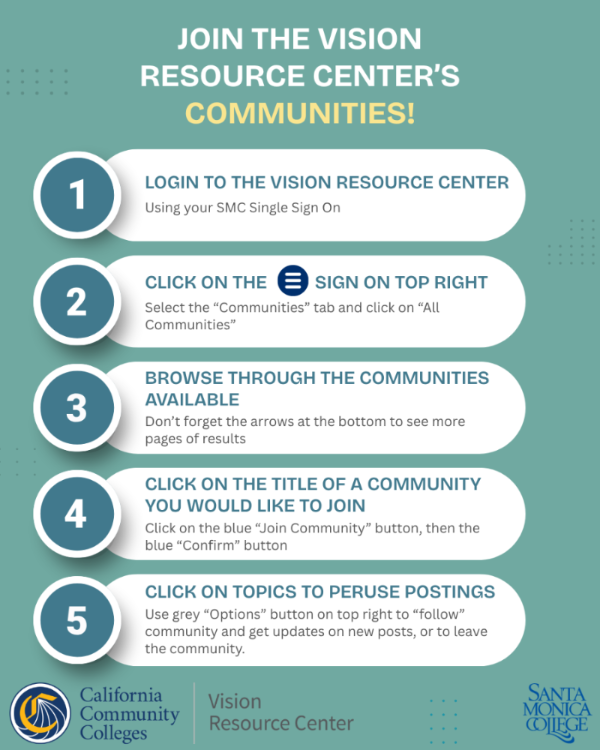
Step by step directions on how to join the Vision Resource Center Communities. Also in plain text on same webpage
 
Image text with steps on how to join the Communities: 
Join the Vision Resource Center's Communities!
  1. Login to the Vision Resource Center using your SMC Single Sign On.
  2. Click on the three white horizontal lines on top right. Select the "Communities" tab and click on "All Communities".
  3. Browse through the Communities available. Don't forget the arrows at the bottom to see more pages of results.
  4. Click on the title of a community you would like to join. Click on the blue "Join Community" button, then the blue "Confirm" button. 
  5. Click on topics to peruse postings. Use grey "Options" button on top right to "follow" community and get updates on new posts, or to leave the community.