



SMC ACCOUNT
SMC accounts are the full SMC email address.
Employee email addresses usually follow this format: lastname_firstname@smc.edu
Student email addresses usually follow this format: lastname_firstname01@student.smc.edu
RESETING YOUR SMC ACCOUNT PASSWORD
-
- Go to the Entra password change form: https://passwordreset.microsoftonline.com/?whr=smc.edu .
- Enter your full SMC email address and complete the CAPTCHA.
- Authenticate your account.
- Enter your new password and confirm it.
Your new password must:
-
- Be at least 12 characters long.
- Not contain your name or significant parts of your name.
- Use at least 3 of the following 4 character types:
- Uppercase letters (A-Z)
- Lowercase letters (a-z)
- Numbers (0-9)
- Special characters (such as !, $, @)
MODIFYING ENTRA MFA OPTIONS
We strongly recommend adding an additional Authentication method as a backup, in case you have a problem with your current one in the future.
- Go to: https://mysignins.microsoft.com/security-info/?tenant=be95da8a-67ab-4574-a292-eeb9e5694a69
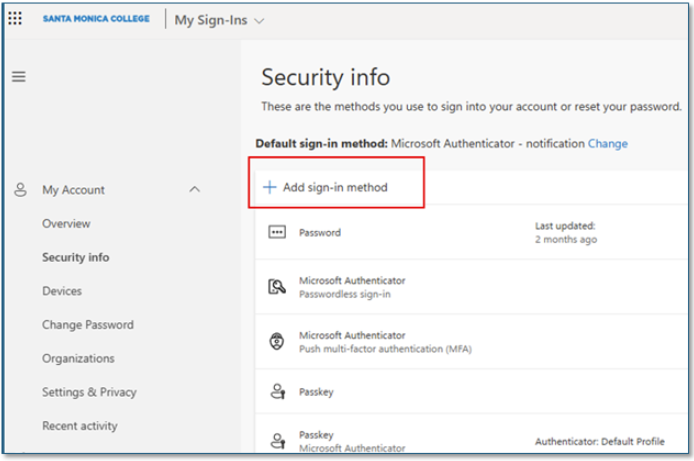
- Select +Add sign-in method and follow the instructions provided for your selection.
If you are locked out of your account because your number changed, don't have access to your phone, or the Authenticator app is not working, you will have to contact SMC Tech support at ITHelp@smc.edu to get back into your account. Please provide your name, your SMC account information, phone number, and a screenshot of the problem if possible.
If you wish to reset the Default Multi-Factor Authentication method:
- Go to: https://mysignins.microsoft.com/security-info/?tenant=be95da8a-67ab-4574-a292-eeb9e5694a69
- Click the Change link:
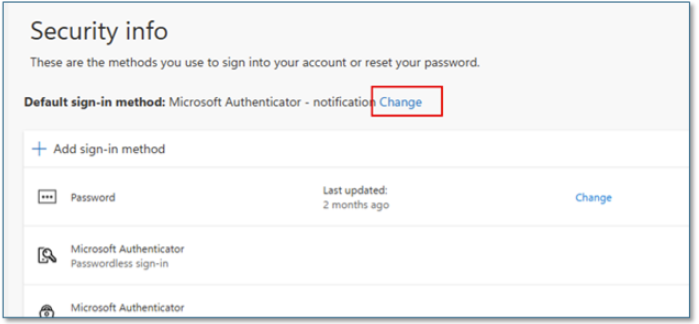
Note: this will only work once you've provided more than one Authentication method.